 Bitcoin Txoko
3.6 KiB
What is a BoltCard?
A BoltCard is a NFC card with a LNURLw record. You can top it up with sats and use it as a debit card to pay merchants and other users who support this technology.
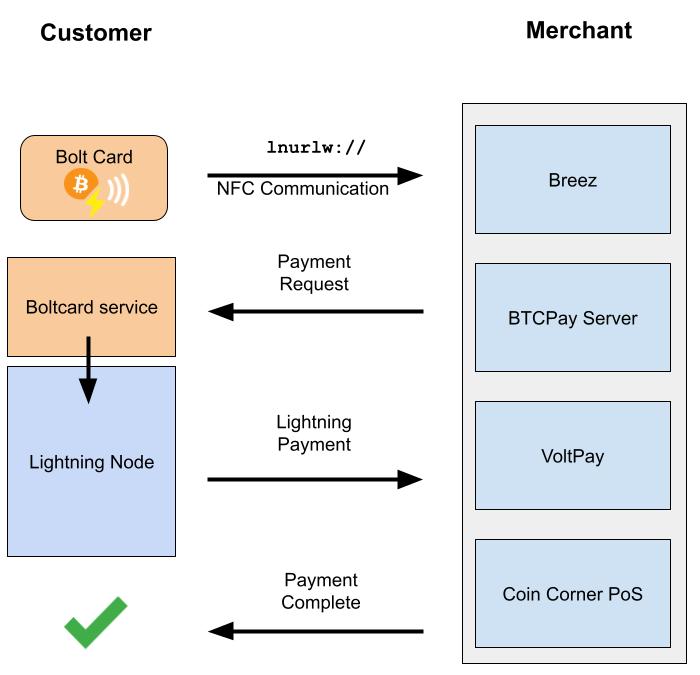 This is how it works behind the scenes.
What do I need?
- A NTAG424 DNA NFC card
- Here are some vendors who sell them online, some of these offer customisable designs:
- NFC cards
- NFC-tag-shop
- Lasereyes
- PlebTag
- Bolt Ring
- A mobile phone with NFC capabilities
- LNbits wallet
1. Enable BoltCard extension
On your phone with NFC capabilities, go to your LNbits wallet link -> Extensions and enable Bolt Cards.
2. Create a new card record
- Open the Bolt Cards extension and press the + button to create a new card.
- Choose the wallet it will be connected to. This is the wallet from which funds will be spent.
- You can set up limits for Max transaction and Daily Limit as a protective measure against malicious merchants draining your card.
- Name your card.
- Press the NFC button then bring your NFC card up to your phone to import the UID from your card.
- Click create card.
3. Write the NFC record to the card
- For this step you will need an app to write the NFC record to your card. I used the official [BoltCard] app.
- On LNbits, show Card Key Credentials and then scan the QR code from the BoltCard app or click Create Link and paste the auth URL into the BoltCard app.
- On the BoltCard app, click Write Card Now and bring the NFC card towards the phone and hold it there until the NFC record has been written onto the card.
That's all! If everything went smoothly, you should have a working BoltCard. You can test it by tapping it against your phone and opening the LNURLw link.
⚠️ Carrying your BoltCard with you means you are carrying real money with you. Someone who steals your card can withdraw all of the sats from your wallet. Practice precaution and keep only a small amount of sats on your BoltCard wallet for daily spending. Always check the merchant is requesting the correct price. Keep your card in a RFID protected sleeve if possible.
Next steps
BoltCard enabled PoS
A number of wallets and point-of-sales (PoS) systems are compatible with the BoltCard. Here is a list of them:
- BoltCard PoS
- Breez
- BTCpayserver
- LNbits TPOS - yes, you can turn your LNbits wallet into a PoS by enabling the TPOS extension!
- VoltPay
- lipa
- Blink
- Wallet of Satoshi
- Blixt Wallet
Support BoltCard
You can also support their effort to create an open source library for programming the cards on Geyser Fund.
NFC gift cards
We have covered how to create a Lightning debit card in this guide, but what if you want to gift someone sats that they can withdraw to their own wallet whenever they want? Well, this is also possible with NFC cards and LNURLw. We will cover this in a future guide.
Not just cards!
You can also write NFC records onto any NFC tag that supports it. An example is the Bolt Ring which offers a NFC-enabled ring.